 English
 العربية
 Français
 Deutsch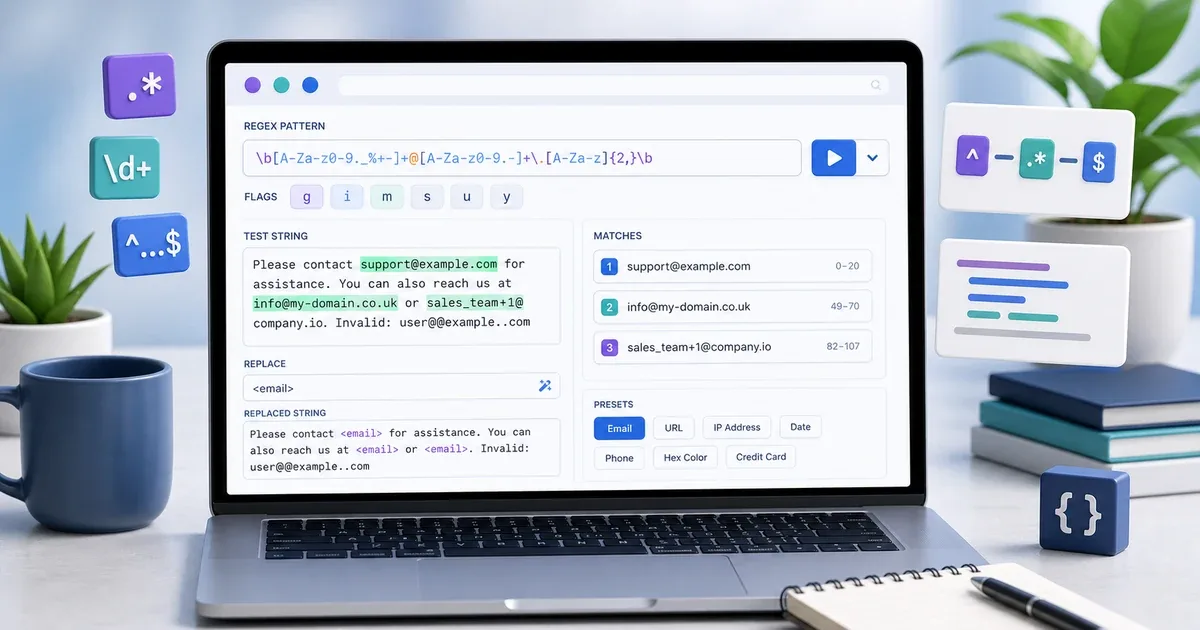
Why test a regex before using it?
Regular expressions are powerful, but they are also easy to get slightly wrong. A missing flag, an unescaped character, or a greedy pattern can match too much, too little, or the wrong part of a text.
That matters when you are validating emails, finding URLs, cleaning pasted data, extracting IDs, replacing repeated text, or checking user input. A pattern that looks correct in your head may behave differently when it meets real text.
Regex Tester gives you a quick browser workspace for testing JavaScript regular expressions before you use them in code, forms, content cleanup, or data processing.
What the tool helps you check
The tool is built for practical testing, not only writing a pattern. You can enter the regex pattern, set flags such as g, i, or m, paste a test string, and immediately see highlighted matches.
It also shows whether the pattern is valid. If the regex is invalid, the tool displays the error instead of leaving you to guess why nothing works.
For each match, the tool can show the index position and captured groups such as $1, $2, and so on. This is useful when you need to extract parts of a result, not just detect whether a match exists.
How to use Regex Tester
- Open Regex Tester.
- Enter the pattern without wrapping it in slashes.
- Set the flags you need, such as
gi. - Paste or type the test string.
- Review the highlighted matches.
- Open the match list to check positions and captured groups.
- Add a replacement string if you want to preview
replaceoutput. - Use a preset pattern when you want a starting point for email, URL, IP address, HEX color, phone, or HTML tags.
The tool uses JavaScript's native regular expression behavior, so it is best for patterns that will run in JavaScript or browser-based workflows.
Flags make a big difference
The same pattern can behave differently depending on flags. The g flag finds all matches instead of stopping after the first one. The i flag ignores case. The m flag changes how line boundaries work.
If your pattern works in one test but fails in another place, check the flags first. A missing g is common when you expect multiple matches. A missing i is common when text may contain uppercase and lowercase versions.
Using the flags field in the tester makes this visible. You can change the flags and immediately see how the highlighted matches change.
Captured groups and replacement preview
Captured groups are one of the most useful parts of regex. They let you keep part of a match and reuse it later. For example, you may match a date and capture year, month, and day separately.
The match list helps you see whether your groups are capturing the right parts. This is safer than writing a replacement blindly.
The replace field is useful for cleanup tasks. You can preview how the text changes before copying the final pattern into code. This helps when you need to normalize phone numbers, remove tags, rewrite URLs, or simplify repeated spaces.
Presets are starting points
The preset buttons are useful when you need a quick pattern for common cases: email, URL, IP address, HEX color, phone, and HTML tags.
Treat presets as starting points, not universal rules. Real-world data can be messy, and each project may need stricter or looser validation. Use the preset, test it with real examples, then adjust it for your case.
If you are preparing URL-friendly text, Slug Generator can help before you test URL patterns. If you are preparing SEO page data, Meta Tags Generator can help after your titles and URLs are clean.
Privacy
Regex Tester runs in your browser. The pattern and test text are processed locally and do not need to be sent to a server.
That makes it practical for draft content, sample logs, internal text snippets, form rules, and private cleanup tasks. Still, avoid pasting sensitive production secrets into any tool unless you have permission to handle that data.
Final tip
Do not trust a regex after only one successful example. Test matching cases, non-matching cases, edge cases, uppercase and lowercase text, empty values, and long text.
Use Regex Tester as a quick safety step before a regular expression reaches your code, spreadsheet cleanup, form validation, or publishing workflow.